


1. 点击:http://ikfh.net
2. forgotten password | public invites (signup) | contact us (please do!)
↑
点击 public invites (signup)
3. 在 http://ikfh.net/cp/invites.php 页面下面的公共邀请中随便点击一个,就可以获得申请资格了。
4. 点击公共邀请后在新页面中点击:Continue to signup.. ,然后填上您申请用的email,点 Send Invitatior 出现下面的E文:
Your invitation has been sent to utf8.free.fr@gmail.com. This will expire in 72 hours.
去收信吧。
5. 信件内容如下,点其中激活链接:
Dear user,
You have been invited to join the free domain website hosting revolution! To find out more and sign-up for our 100% free service, please click the link below.
If you did not request an invitation or do not want free domain website hosting, simply ignore this e-mail.
If you like our service, please feel free to leave a comment with us via our contact form.
Regards,
iKfh.net
6. 再次点击:Continue to signup..
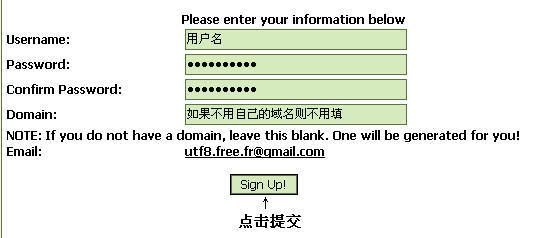
7. 点击 Sgn UP! 后,页面会显示您申请成功后空间的详细资料:
Congratulations! Your account has successfully been created. Your login details are as follows:
You may login to our control panel at ikfh.net/cp
8. 点:ikfh.net/cp 登录,FTP密码进cp可以看到,每24小时更新。

 谢谢
谢谢